Questions & answers
Everything about how Boonora works — earning and spending, your card, gift cards, referrals, and joining as a business.
Getting started
Just signed up? Here is exactly what happens next — every step, with the actual screens.
Or you can click here for our new client welcome page and video →
Business owners: click here for the business welcome page and video →
I just signed up as a new client. What do I do now? How does this work?
Boonora is one rewards card that works at every business on the network. You earn Boons when you spend at any of them (100 Boons = $1.00) and you can spend those Boons at any other. Your phone number is your account — there is no app to download. Here is your first week:
- You joined — and you already have 100 Boons.
Either you filled in the join page (name, mobile number, optional email) scanned a business's QR at the counter, or a business texted you its join link and you tapped it. Either way, 100 welcome Boons ($1.00) are in your wallet right now, and you got a welcome text from Boonora.
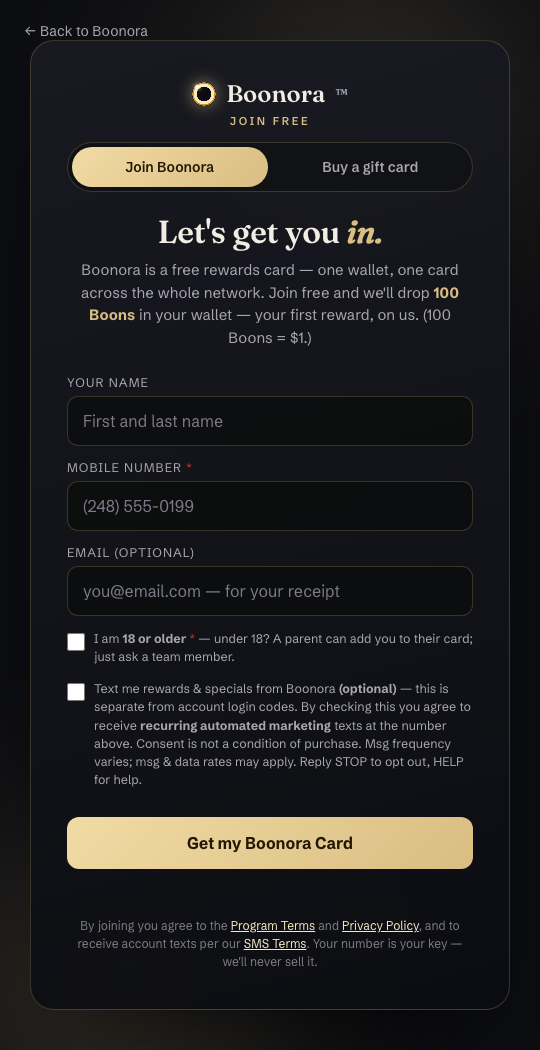
The join page — your mobile number is the only thing we truly need. - Open your card.
Tap the link in your welcome text, or go to boonora.com → My card. Enter your mobile number and we text you a one-time sign-in code — no password to remember. Your card shows your Boons balance, your tier, your QR code, and every earn and spend.
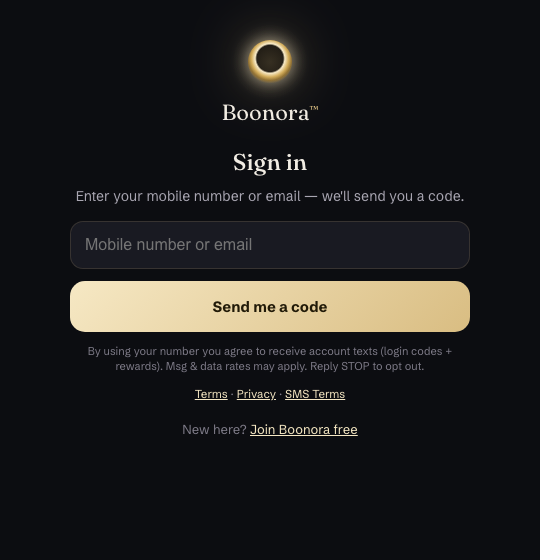
Signing in: your number, then the code we text you. - Save the card to your phone.
On your card, tap Add to Apple Wallet or Add to Google Wallet. The pass carries your QR code, so at a counter you just show your phone. Prefer a shortcut instead? Add to Home Screen puts your card one tap away.
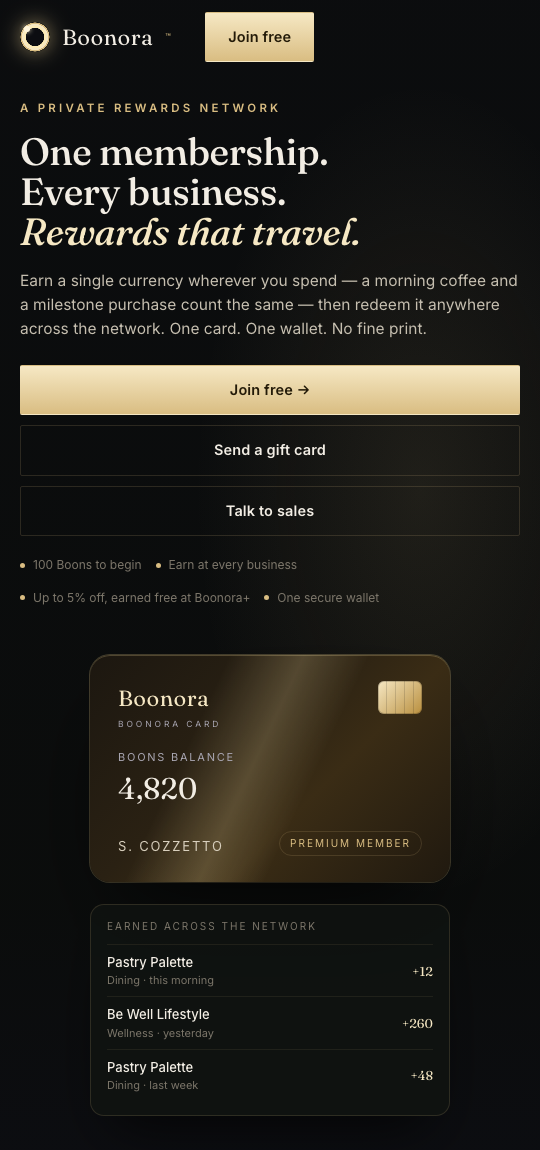
Your card: balance on top, everything you've earned across the network underneath. - Set your 4-digit PIN (you need it to spend).
Your QR code identifies you, but every payment needs your PIN — that is what makes it safe to show your code. Set it once: tap Set PIN on your card, or text PIN to (447) 747-4364 and follow the link we send. Only you type your PIN, never the staff.
- Earn at any Boonora business.
At checkout, give your phone number or show your QR code. Staff tap Run card / Boonora (or scan your code) and the Boons are added to your card on the spot — most businesses give around 10% back, so a $100 visit puts about $10 of Boons in your wallet. You'll see it on your card straight away.
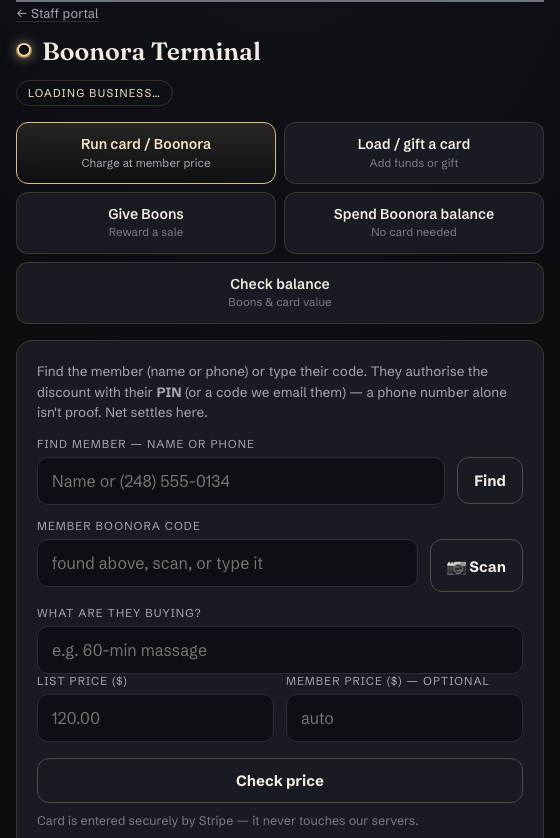
What the business sees at the counter — Give Boons rewards your purchase; Spend Boonora balance is how you pay with Boons. - Spend your Boons anywhere on the network.
Say "I'd like to pay with my Boons." Staff look you up by number or code, enter the amount, and you type your PIN to approve. Boons earned at a café work at the wellness centre and vice versa. You can pay part in Boons and the rest by card or cash. For larger amounts you'll get a quick text asking you to approve it first — nobody can spend your balance but you.
- Check your balance any time — by text.
Text BAL to (447) 747-4364 for your balance, CARD for a link to your card and QR, WALLET to add it to your phone, PIN to set or reset your PIN.
BAL
Boonora: you have 1,250 Boons + $25.00 (of that $25.00 is gift card value). Spend at any Boonora business. Reply GIFT for gift cards, CARD for your QR, WALLET to add it to your phone, or PIN to set a spending PIN. - See who's on the network.
Tap Explore all businesses & offers on your card (or open the businesses page) for every participating business and their current specials. Ask at any counter, "do you take Boonora?" — new businesses join regularly.
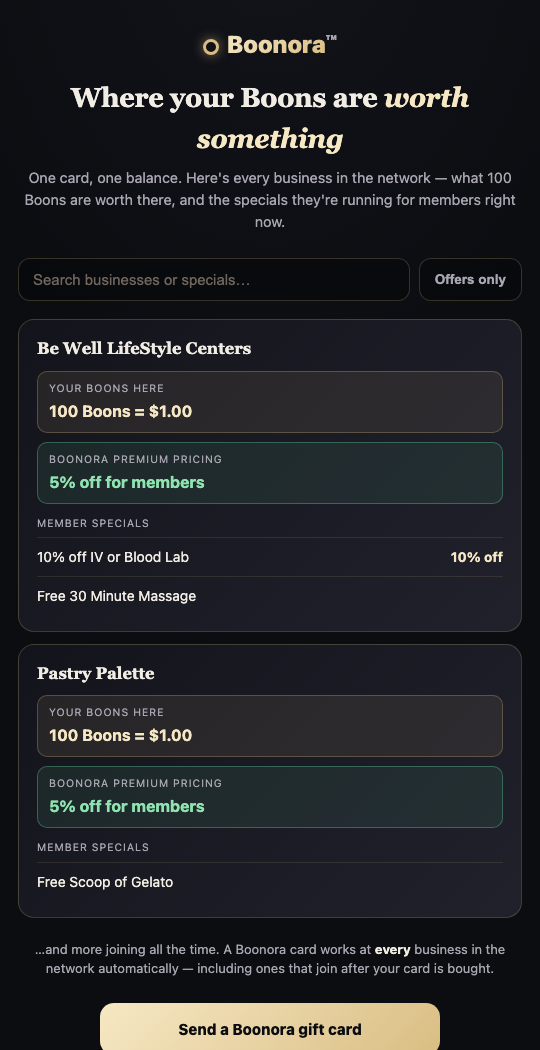
The businesses page — where your Boons are welcome. - Let the ladder climb on its own.
You start as a Member (1× Boons on every purchase). At 5,000 lifetime Boons you become Boonora+: 1.25× Boons and up to 5% off at participating businesses. At 10,000 you're Boonora Elite: 1.5× Boons, the top earn rate. Nothing to apply for — your card shows how close you are.
- Optional: Premium, for 20% off every visit.
If you'd rather have the best rate today, tap Go Premium on your card: $19/month or $180/year gets you 20% off at every participating business from your first visit, and you keep earning Boons on top. Most members make it back in one visit. Cancel any time from your card.
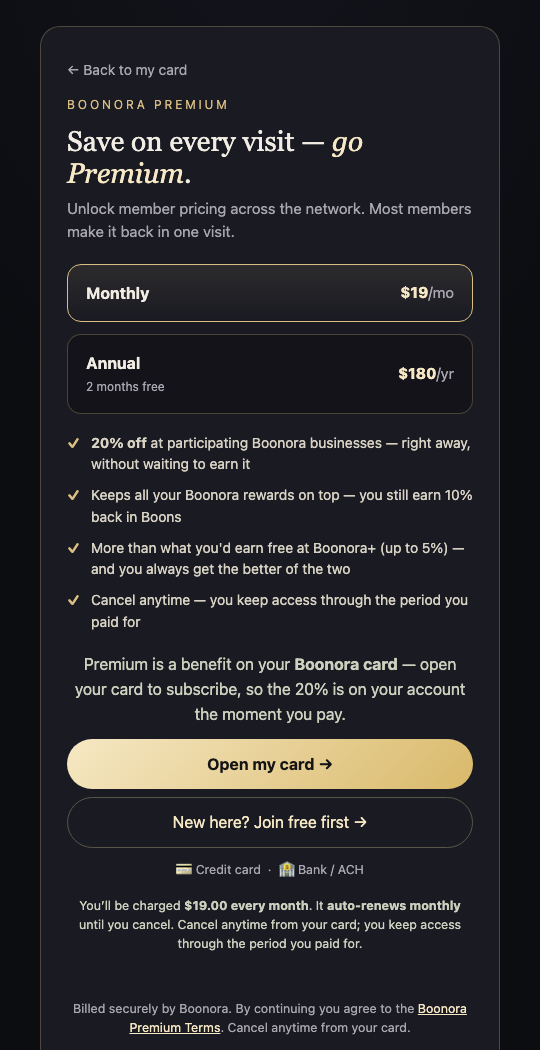
Premium — the one number that's the same at every business. - Bring a friend, get paid.
Your QR code doubles as your referral link. Share it from your card; when a friend joins and spends, you earn cashback in Boons — and the bonus grows as you climb the ladder.
- Texts are yours to control.
Reply STOP to any message to stop texts, START to turn them back on. Sign-in codes and balance replies are separate from marketing texts, which you only get if you ticked the box.
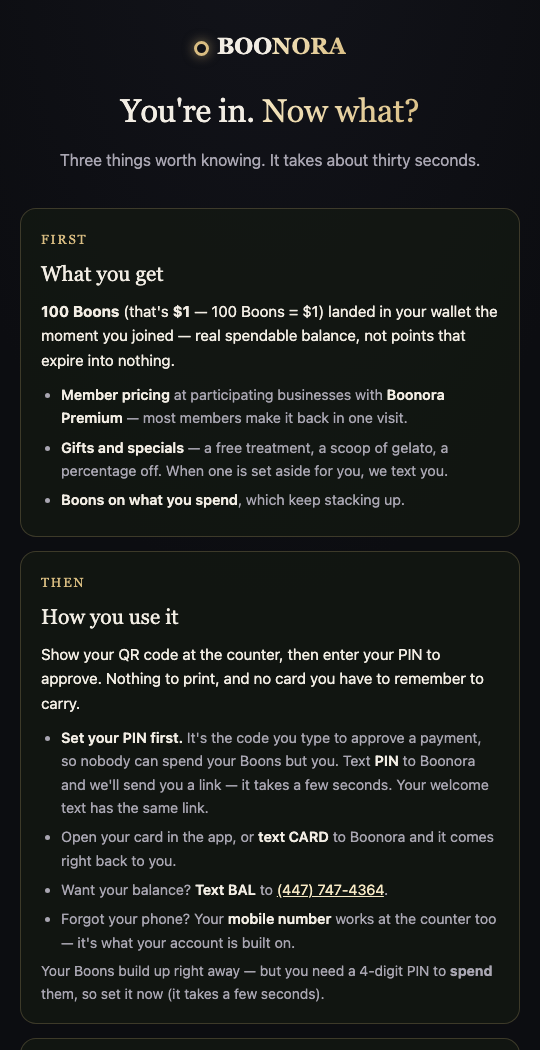
The 30-second version of all this lives at Start here.
I just signed up as a business. What next? How does this work?
Your business is now part of a network where every Boonora business markets for every other one. Your customers earn Boons with you and can spend them anywhere on the network; other businesses' customers can spend theirs with you. You set the rewards, the network brings the customers, and the money is settled for you. Here is your first month, step by step:
- You created your business — check your email.
On List your business — free you gave us the business name, your name, email and phone and tapped Create my business. We emailed you a confirmation link.
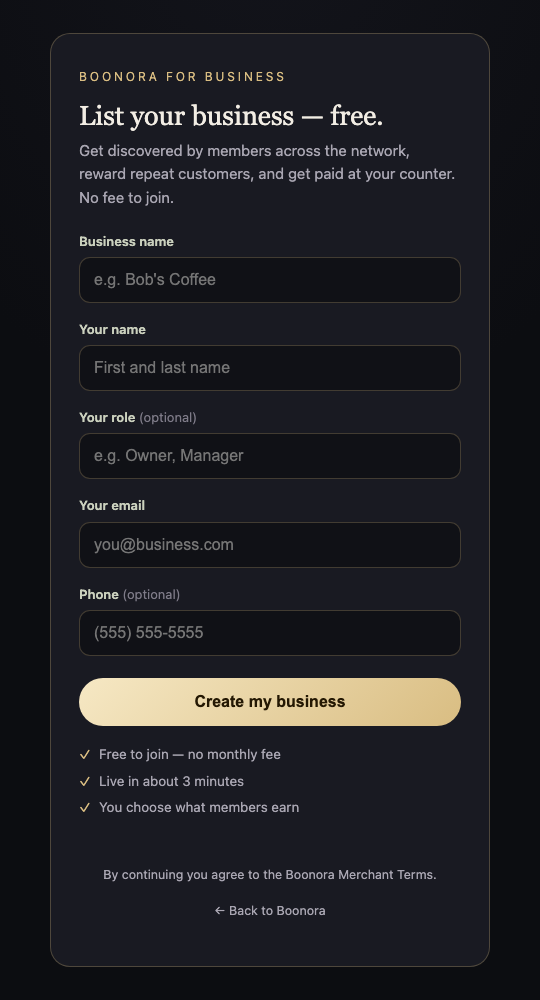
The sign-up page — free, no hardware, no till integration. - Click the link, note your Merchant ID, create your PIN.
The link confirms your email and shows your Merchant ID. Create the PIN you'll use to sign into your terminal and tap Set my PIN & finish. Keep the PIN private — it is how you sign in at the counter. We also email you the Merchant ID and full sign-in details, so keep that message.
- "Your business is live!" — open your terminal.
Tap Open my terminal → and it opens already signed in. Bookmark it. On the iPad or phone you'll use at the counter, use Share → Add to Home Screen so "Boonora" opens full-screen with one tap. You start with a default earn rate (2% back) — you'll set your real numbers in step 5.
- Watch the 2½-minute welcome video.
The welcome guide has the video and covers the three dials to set today, what runs on its own, and what to expect in your first month. Bookmark it — you can come back to it any time from here.
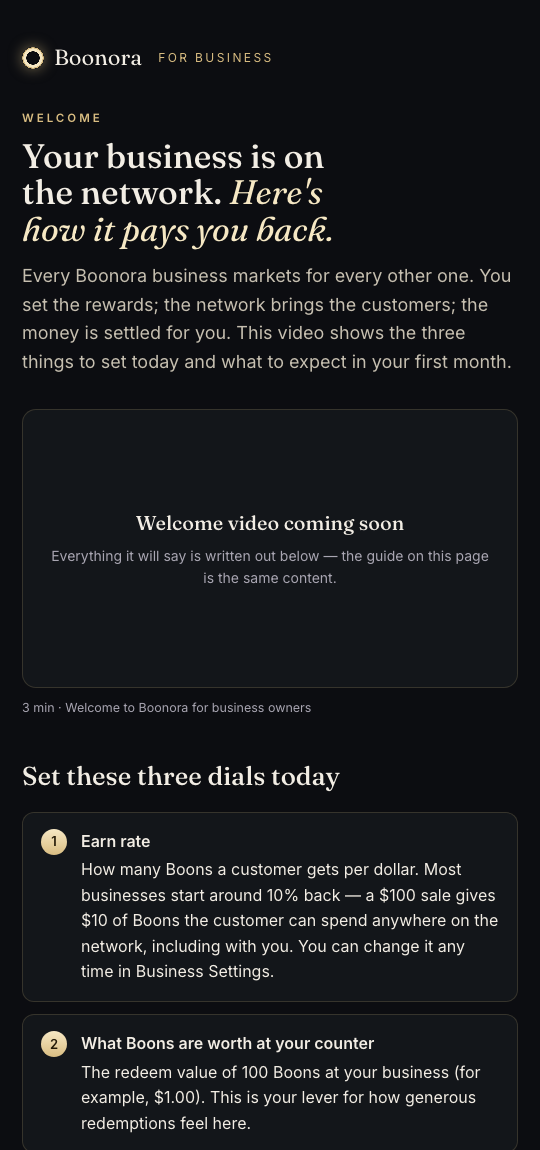
The business welcome guide. - Set your three dials today.
- Earn rate — Boons per dollar, in Business Settings. You choose: cafés and retail typically give 2–5% back, services 5–10%. A $100 sale at 10% gives the customer $10 of Boons, spendable anywhere on the network (including with you).
- Member discount — what Boonora+ members (5,000+ lifetime Boons) get with you, up to 5%, also in Business Settings.
- Your first special — open Reward Specials → This Week's Special and add a limited-time offer. It's pushed to members across the whole network — the fastest way to have someone else's regular walk through your door this week. Keep one live at all times. You can also set an Everyday Welcome Gift for new sign-ups.
Two numbers you don't set: a Boon is worth one cent (100 Boons = $1.00) at every business, and Premium members get 20% off everywhere. Both are advertised on boonora.com for the whole network and every participating business honors them — the way a store honors a credit card's terms.
- Put your QR at the counter.
In the terminal tap My printable counter QR — for a counter with no device (or Your Business QR in Reward Specials), print it, and stand it by the register. Customers scan it to join or pay from their own phone — no device needed on your side.
- Show your staff the two moves they need on day one — the terminal has the rest.
Sign someone up: ask for their mobile number and tap Text a link to join on the terminal. They tap the link on their phone, enter their name, and they're in with their welcome bonus — or they scan the QR on your counter sign. Apply rewards: tap Run card / Boonora — on your register if you run it on Business Lab, or on the Boonora Terminal. The member's tier or Premium discount applies automatically and your limits are enforced.
The terminal — everything happens on one screen. The terminal's five tabs, for when you need them:
- Run card / Boonora — take a card payment at the member price.
- Give Boons — reward a normal cash/card sale: look up the member (number, name, or 📷 Scan their card), enter what they spent, done.
- Spend Boonora balance — the member pays with Boons: enter the amount, they type their PIN.
- Load / gift a card — sell a gift card or add funds.
- Check balance — scan or type a number to see what a member has, no PIN needed.
- Connect your bank so you get paid.
When a member spends Boons they earned elsewhere, the network reimburses you. Open Boonora Accounting and tap 🏦 Connect bank → — a one-time Stripe link. Payouts are weekly once it's connected.
- Understand the money — it's one running balance.
Rewards you funded vs. rewards you honored. When you honor more than you funded, the network pays you; when the reverse, you're billed. Fees: 1% issuance on the Boons you award (purchased value — gift cards and loads — carries no fee) and 0.75% on settled activity. Boonora Accounting shows what you're owed, what you owe, every transaction and payout, with CSV export — read-only and always current.
- Your own texting line.
Member texts (welcome, balance replies, specials) go out on your business's own number. Carrier registration takes a few business days after sign-up; until then they route on the shared Boonora line.
- Your first 30 days.
- Week 1 — go live. Dials set, first special out, counter QR up, staff shown the moves above.
- Week 2 — watch the ledger. Open Boonora Accounting: the first redemptions from members who earned elsewhere are new customers.
- Week 3 — run a second special. Members respond to fresh offers.
- Week 4 — review with us. Members from other businesses, redemptions, and lift. Adjust your earn rate with data, not guesswork.
The basics
What is Boonora?
Boonora is a rewards network shared by independent businesses. You earn Boons when you spend at any member business, and you can spend those Boons at any other member business — not just the one where you earned them.
That's the difference from an ordinary loyalty card. Points you earn at a café can pay for something at a wellness centre, a shoe shop, or anywhere else in the network.
What is a Boon worth?
100 Boons = $1.00 — the same everywhere in the network, always. One Boon is one cent, set by Boonora, at every business.
Individual businesses can't change what a Boon is worth — that keeps your balance honest and worth the same wherever you spend. A business shows its generosity in other ways: a higher earn rate, member discounts, or specials.
How do I join, and does it cost anything?
Joining is free. Scan a member's QR code or open their invite link, enter your name, mobile number and email, and you're in.
100 Boons land in your wallet immediately — no purchase required, nothing to claim.
How old do I have to be?
You must be 18 or older to open your own Boonora account.
Under 18? A parent or guardian can add you to their card at any participating business — just ask a team member. You can earn and spend the same way; the adult holds the balance, sets the PIN, and is the account holder.
We ask you to confirm your age when you join. We don't create accounts for under-18s on their own, and we don't send marketing texts to them.
Do my Boons expire?
Boons you bought, and gift-card money loaded to your card, never expire.
Promotional Boons — ones given to you rather than paid for — may carry an expiry. If they do, we tell you when you receive them.
How do I check my balance?
Two ways. Open the member app and sign in, or simply text BAL to the Boonora number and we'll text your balance straight back.
Your card
Where is my card and my QR code?
Your card lives on your phone. Text CARD to the Boonora number and we'll send you a direct link to your QR — no sign-in needed to show it.
You can also open the member app and go to your card there.
Can I get a physical card?
Yes. Open your member card and tap Request a physical card. We'll review the request and post one to you.
Your card on your phone keeps working the whole time — the plastic one is a convenience, not a requirement.
I don't have a PIN yet — how do I set one?
Text PIN to Boonora and we'll send you a link to choose one. It takes a few seconds, and you can do it standing at the counter.
You pick the digits yourself — staff never see them, and we can't show them to you or anyone else later. If you'd rather, the same link is in your welcome text, or you can set one in the app.
Your Boons keep adding up whether or not you have a PIN. The PIN is what lets you spend them.
I've forgotten my PIN — what now?
Ask any Boonora business to reset it for you, or open the Boonora app and change it there — we check it's really you first.
Nobody can tell you what your PIN is, not even us. It's stored scrambled, so the only option is to set a new one. That's deliberate: it's what stops someone talking a staff member into handing over your code.
Your balance is untouched by a reset.
What is my PIN for?
Your card PIN is what stops someone else spending your Boons. A payment cannot be taken without it, even if somebody has your card or a photo of your QR code.
Set or change it at any member business's front desk, or in the member app.
I lost my phone. What now?
Your Boons are tied to your account, not the device — nothing is lost. On a new phone, open the Boonora app and sign in with a one-time code sent to your mobile number or email; that's the way in from a device that has never been used before.
If you think someone else might use your card, change your PIN straight away, which immediately blocks spending.
Spending Boons
How do I pay with Boons?
Show your QR code, or give your name or phone number at the counter. Staff enter the amount, and you enter your PIN to approve it. That's the whole transaction.
The business does not need any special till or card machine — a phone or tablet is enough.
Can I use Boons anywhere in the network?
Yes. One card, one balance, every member business — including businesses that join after you got your card.
See who accepts Boonora and what they're offering on the businesses page.
Can I pay part in Boons and part in cash or card?
Yes. Boons come off the total and you pay the rest however you like.
Do I get a discount just for being a member?
There are two ways to get one, and you don't have to pay for the first:
- Earn it. At Boonora+ — 5,000 Boons, which is $50 of rewards earned — you get up to 5% off, free, for as long as you're a member.
- Or subscribe. Boonora Premium ($19/mo or $180/yr) gives you 20% off straight away, without waiting to reach Boonora+.
Either way it's applied automatically when you pay — no voucher, nothing to claim. If you're Premium and Boonora+, you get the better of the two, never the smaller one.
Every member, free or paid, earns 10% back in Boons on what they spend. That part has never required a subscription.
Each business sets its own Premium rate, and some offer none. You can see who offers what on the businesses page.
What are the specials?
Member businesses run offers just for Boonora members — a free item, a percentage off, a treatment. They're listed on the businesses page and they change.
Something went wrong with a payment. What do I do?
Contact the business where it happened first — they can see the transaction. If it isn't resolved, contact Boonora and we'll trace it.
Every transaction is recorded against your wallet, so nothing is untraceable.
Gift cards
How does a Boonora gift card work?
You buy it online for someone by entering their name and mobile number and paying by card. The value loads onto their Boonora card, ready to spend at any member business.
It isn't tied to one shop, so the person you're giving it to gets to choose.
What if they're not a Boonora member yet?
That's fine — an account is created for them and the money is held there. When they sign in for the first time with their phone number, it's waiting.
I mistyped their phone number.
Contact us as soon as you notice. The mobile number decides who receives the money, which is why we ask you to confirm it before paying.
We also notify the account holder whenever money is added, so a misdirected gift gets spotted quickly.
Does gift-card money expire, and are there fees?
No expiry and no fees. The amount you pay is the amount that lands.
Referrals
How do referrals work?
Every member has a personal QR code and link. Share it — text CARD to get yours. When someone joins through it, they get their 100 welcome Boons, and you earn as they spend at member businesses.
What is the Boonora affiliate programme?
Members can go a step further and become affiliates, earning a commission in Boons on what the people they refer spend across the network.
Affiliate earnings are Boons — added to your Boonora card and spendable at any member business, right away. There's a short holding period on new earnings (until the refund window closes), then they're yours to spend.
How do I become an affiliate?
Open the affiliate page from your member app and enrol — that's it. Your referral Boons land on your Boonora card automatically; there's no bank or tax setup because you're paid in Boons, not cash.
Is there anything referrals don't apply to?
Yes — referral rewards are not paid on spend at healthcare businesses in the network. Paying someone for sending a patient to a medical practice isn't permitted, so we exclude it. Everything else in the network counts as normal.
For businesses
What does joining Boonora involve?
Very little. There's no till integration and no hardware to buy — you open a web page on any phone or tablet, sign in with a merchant ID and PIN, and you can accept Boonora.
You keep your existing register exactly as it is.
How do I get paid when someone spends Boons at my shop?
When a member spends Boons funded by another business, Business Lab reimburses you. Your terminal shows what you're owed, and settlement happens on a regular cycle.
Can I decide what Boons are worth in my shop?
No — and that's the point. A Boon is worth one cent (100 Boons = $1.00) at every business, set by the network, so a member's balance is worth the same wherever they spend it.
What you do decide: your earn rate (how many Boons a customer gets per dollar with you), your member discount for Boonora+ members (up to 5%), and your specials, published to the businesses page and pushed to members across the network.
How do I join as a business?
Fill in List your business — free: business name, your name, email and phone. Confirm the email we send, create your terminal PIN, and your business is live with a terminal you can open on any phone or tablet. The full walkthrough is under Getting started → I just signed up as a business.
Privacy & safety
What do businesses see about me?
Only what they need to serve you: your first name, and whether you have enough balance for the sale. A business does not get your full details, your history at other businesses, or your balance breakdown.
Businesses cannot browse the member list. Healthcare records are kept entirely separate from the rewards network.
Is my information shared between the businesses?
Your Boonora card and Boons are shared — that's the whole point: you earn at one business and spend at another, all on one card that follows you everywhere.
But your records are not shared. Each business keeps its own private file about you — your contact details and your history with them — and businesses cannot see each other's files. If you're a customer at two businesses, each has its own separate record; they're never merged. Only your Boonora wallet is the shared part; everything a business knows about you personally stays with that business.
Can someone spend my Boons if they get my QR code?
No. Your QR identifies you but doesn't authorise anything — every payment needs your PIN. That's why the QR is safe to show, print, or share as a referral link.
How do I stop the texts?
Reply STOP to any message. Marketing texts are opt-in — you'll only get them if you asked for them — and account messages like sign-in codes are separate.
Still stuck? Email help@boonora.com or text
(447) 747-4364 — a real person will answer.
Running a business and want to join? That's the
business enquiry page.